
Top 29 Stockfill Alternatives in 2026
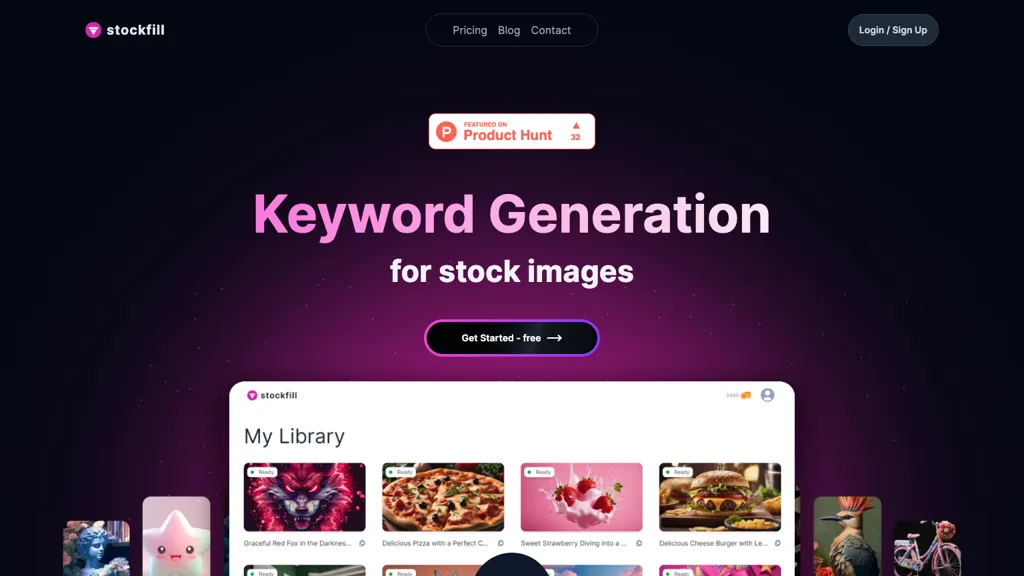
No user reviews yet FreemiumStockFill AI Tool optimizes stock images by automatically generating keywords for JPG, PNG, and illustrations. It simplifies the process, displays previews, and fosters collaboration among users to boost image discoverability.
We've ranked 29 Stockfill alternatives, including 22 with a free plan. Rankings are based on feature coverage and user feedbacks.
Top-rated alternatives include Impossible Images, StockCake, and StockImg AI.
29 Stockfill Alternatives & Competitors, Ranked by User Reviews
Click Compare on any tool to compare it side-by-side with Stockfill.
 #1
Impossible Images
#1
Impossible Images
The AI-powered Stock Image Library generates customized stock images for websites. Its advanced algorithms help users quickly locate high-quality, visually appealing images to improve their online content and enhance the overall website appearance.
 #2
StockCake
#2
StockCake
StockCake delivers millions of AI‑generated stock photos with free commercial licensing. Search, instant download, on‑the‑fly editing, and variation creation streamline designers’ workflows. Prompt‑based generation and curated collections support tailored visual content.
 #3
StockImg AI
#3
StockImg AI
Stockimg AI generates logos, illustrations, stock photos, and social media graphics, letting users create, edit, and schedule posts for over ten platforms from a single interface. Its API integration and on‑demand engine streamline visual content production.
 #4
Designer Clone AI
#4
Designer Clone AI
Stockimg AI generates logos, illustrations, and social‑media assets from text prompts, offering background removal, bulk scheduling, and cross‑platform publishing via an integrated calendar. A mobile app allows on‑the‑go daily editing.
 #5
AI Keywording Tool
#5
AI Keywording Tool
Pixify Studio automatically generates titles, descriptions, and keyword tags for images and videos. It supports drag‑and‑drop, folder uploads, and FTP, processes large batches with a single credit per asset, and stores metadata on Amazon S3.
 #6
There is a logo for that
#6
There is a logo for that
Stockimg AI produces logos, illustrations, photos, and social‑media assets from text prompts and builds short video clips with audio and subtitles. Users edit, schedule, and publish across multiple platforms, streamlining content creation for agencies, marketers, and creators.
- Catch deals before they expire
- Unlock tools matched to you
- Show off your AI stacks
Already a member? Sign in
 #7
Canva AI
#7
Canva AI
Canva's AI Image Generators turns text into visuals with customizable art styles and features like Magic Media, Create an Image, and automated reviews.
 #8
AI Keywording
#8
AI Keywording
AI Keywording processes up to 10,000 images per upload, using AI to generate titles, descriptions, and keywords for stock photography. Outputs a CSV ready for stock sites or Adobe Bridge, with temporary image copies deleted after processing.
 #9
Png AI
#9
Png AI
Png AI is a free AI tool that generates PNG images from text descriptions in seconds. It also allows you to remix and modify existing images using its core Flux model, with no registration required.
 #10
Text To Book Cover
#10
Text To Book Cover
Stockimg AI generates logos, illustrations, wallpapers, posters, avatars, stock photos, and short‑form video from text prompts. It auto‑adds audio, subtitles, and offers a social‑media dashboard to edit, schedule, and publish across multiple accounts.
 #11
123RF
#11
123RF
123rf Image Editor is a comprehensive AI tool for effortless photo editing, offering features like image scaling, background removal, object removal, and seamless background remixing. It also includes an AI writer for content creation and an image enlarger for ratio adjustments. Efficiently enhance and edit your visuals with this user-friendly tool.
 #12
AI Describe Picture
#12
AI Describe Picture
Describe Image & Picture extracts text, alt descriptions, and HTML snippets from PNG, JPEG, or WEBP files up to 2 MB, converting visuals into editable Markdown or code, auto‑tagging photos, and generating Flux image variants for creators, developers, and marketers.

Upload a stock photo and use AI to generate multiple variations that match desired style, composition, and color. The tool automatically enhances quality while preserving the original content, enabling designers, creators, and marketing teams to produce variants quickly.
 #14
ImageTool
#14
ImageTool
ImageTool aggregates free stock photos from Unsplash, Pexels, and Pixabay, offers AI image generation, and allows bulk upload, crop, compress, resize, and export to WebP/AVIF, simplifying web asset workflows for web designers and developers.
 #15
StockPhotoAI
#15
StockPhotoAI
StockPhoto AI uses cutting-edge AI technology to create unique and high-quality stock photos tailored to your needs. Say goodbye to generic stock photo libraries and elevate your designs effortlessly with minimal input required.
 #16
imagedescriber.app
#16
imagedescriber.app
Generates detailed image descriptions, SEO-friendly alt text, and searchable tags from JPG/PNG/WEBP; performs OCR on text and tables, summarizes charts, converts images into prompts, and offers batch processing, API, and chat-for-image Q&A for workflows.
 #17
Image Caption Generator
#17
Image Caption Generator
The Image Caption Generator is a free online AI tool that generates captions and descriptions for images based on selected tones. You can use it to caption instagram, twitter or any social media post.
 #18
Meta Image Generator
#18
Meta Image Generator
Meta AI generates images and short videos from text prompts or uploaded photos, offering fast text-to-image, editing (add/remove elements, background removal), one-click restyling, and photo-to-animation tools for rapid prototyping and visual asset creation.
 #19
Stock Photo AI
#19
Stock Photo AI
StockPhotoAI is an AI tool using OpenAI DALL-E models to create high-quality, personalized stock photos for websites, slideshows, and print media. Say goodbye to generic images with full royalty licensing rights for exclusive use.

DeepAI offers browser‑based AI tools for text‑to‑image, photo editing, background removal, super‑resolution, and video/musical generation, plus APIs for integration. It prioritizes user ownership, privacy, fast processing, and supports conservation research via object detection and habitat mapping.
 #21
AI Image Generator/Search
#21
AI Image Generator/Search
Generates millions of AI‑generated images from prompts, offering stylized, realistic, vintage, cartoon, and sci‑fi options. Users can fine‑tune style, color, and composition for concept art, storyboarding, teaching, or marketing, with workflow integration and export tools.
 #22
AI Animate Image
#22
AI Animate Image
AI Animate Image is an online tool that uses AI to transform static photos into dynamic animations with various styles. It supports multiple image formats, offers fast cloud-based rendering, and is ideal for social media and creative projects.
 #23
Image Describer
#23
Image Describer
Image Describer generates detailed text from jpg/png/webp/gif images up to 5 MB. Users choose templates or custom prompts, process bulk uploads, export English descriptions, alt text, marketing copy, or AI art prompts, with TTS and OCR support.
 #24
AltTextGenerator
#24
AltTextGenerator
AltTextGenerator is a free, AI-driven online tool that automatically creates high-quality alt text for images, enhancing SEO and accessibility. It supports various image formats, providing instant, contextually relevant descriptions to improve website visibility and user experience.
 #25
Everypixel
#25
Everypixel
Stock image finder that provides a variety of use cases for finding the best licensed images at the lowest price.
 #26
ImgGen
#26
ImgGen
ImgGen AI is a free online AI image generator that swiftly creates watermark-free images based on text prompts. It offers features like image restoration, color correction, and upscaling, making it a versatile tool for various visual projects.

ImageGeneratorAI.io is a browser-based AI image generator that transforms text prompts into high-resolution visuals using models like SDXL and Flux. It offers extensive customization for style, aspect ratio, and composition, enabling rapid creation of marketing assets, concept art, and social media content.

Pixlr is a browser‑based photo editor that uses AI for background removal, generative fill, and object deletion. It offers cropping, color correction, collages, templates, and social media layouts across desktop, tablet, and mobile.
 #29
AI Canvas
#29
AI Canvas
Kive automatically creates on‑brand product images from a URL or upload, applying preset styles like studio clean or editorial. It integrates product data, preserves lighting and color consistency, and lets teams edit and manage assets in a single workflow.